
Symbols and Instances - Editing Instances
| In the previous tutorial you learned how to edit a symbol and thus change all the Instances on the Stage. Now you will learn how to edit each Instance individually. |
| Step 1 - Select one of your Frogs in Single Click it. Make sure you only single click because you only want to edit this particular Instance. | 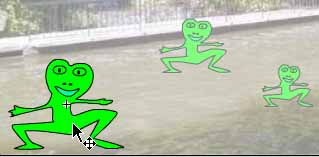 |
| Step 2 - In Properties look under Color you will see several options. Experiment with the different options. Choose another frog and continue to experiment. You can do this with all of your frogs. | 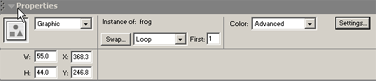 |
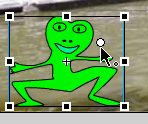
| Step 3 - Choose a frog and select the Free Transform tool. Experiment with this with other frogs. | |
Step 4 - While using the Free Transform did you notice the small white circle in the center? You can move this and thereby move the Registration point. After this any transformations will originate from this point. Continue to experiment with making changes to Instances individually. |
 |
Home
Page | Dreamweaver/Fireworks Introduction
| Flash Interface | Flash
Tools | Animation | Tweening
| Symbols/Instances | Buttons
| Sounds
Graphic
Symbols | Symbol Instances |
Editing Symbols | Editing
Instances | Animating Symbols