
Flash Animation - Copying Frames
The previous exercise showed you how you can add and delete frames. This exercise will show you how you can copy and reverse frames to create a loop.
|
Step 1- Click on the Layer with your Frog... this selects all the frames on the layer. |
 |
| Step 2- Move the cursor over the selected frames click and drag to the right - while still holding the mouse button down, press ALT (Win) or OPTION (Mac) and release the mouse. You've now duplicated the frames. | 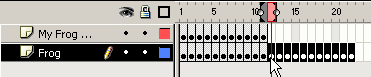 |
| Step 3 - With frames 12-22 still selected choose Modify > Frames > Reverse | |
| Step 4 - Continue to play with copying frames. |
Home
Page | Dreamweaver/Fireworks Introduction
| Flash Interface | Flash
Tools | Animation | Tweening
| Symbols/Instances | Buttons
| Sounds
Timeline | Properties
| Keyframes | Onion
Skinning | Frame Rate | Adding
and Deleting Frames | Copying Frames
| Testing