
Flash Animation - Keyframes
Types of Keyframes:
| Blank Keyframe | Keyframe | Frame | Clear Keyframe | Remove Frames |
| A blank keyframe shows on the Timeline as an open circle. It means that there is no artwork on the Stage at that frame. | A keyframe shows on the Timeline as a solid circle. This means that there is content on the Stage. | You can have a different number of frames on different layers. | This erases the keyframe from the Timeline. This removes all the content from the Stage | Select the frames you wish to remove and choose Insert>Remove Frames. |
Step 1 - Make sure you still have your mymovie.fla open. You are going to write the phrase 'My Frog Movie' so that it will appear one frame at a time Pick the Brush tool (any size and any color) |
|
Step 2 - On the Stage draw an M Notice the that on the Timeline your Blank Keyframe has now changed to a Keyframe. |
 |
Step 3 - Select Frame 2 on the Timeline and insert a new Keyframe. Add the Y to form the word My.
|
 |
| Step 4 - Continue to insert a new Keyframe for each letter until you spell out the phrase: My Frog Movie |  |
| Step 5 - Notice the Timeline - you should have 11 Frames - almost one second of animation! - Drag the Playhead back to your first Keyframe. | 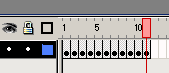 |
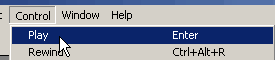
Step 6 - Under Control
> Play Make any changes you want make. |
 |
Home
Page | Dreamweaver/Fireworks Introduction
| Flash Interface | Flash
Tools | Animation | Tweening
| Symbols/Instances | Buttons
| Sounds
Timeline | Properties
| Keyframes | Onion
Skinning | Frame Rate | Adding
and Deleting Frames | Copying Frames
| Testing