
Flash Animation - Document Properties
| Before you can start creating a movie you need to set general specifications that affect the project. These include: Stage dimensions, frame rate, and background color. | |
| Step 1- Open Flash and create a new file. Save it as testmovie.fla | |
| Step 2 - Look in the Property Inspector. The default size is 550x400 pixels; white background; and 12fps |  |
| Step 3 - Click on the background and you can change the background color of your stage. | 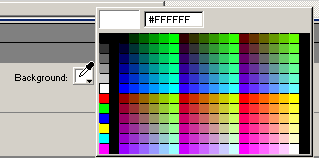 |
| Step 4 - Click on the size and you can change the size of the stage. In this window you can also change the background color, frame rate and ruler units. | 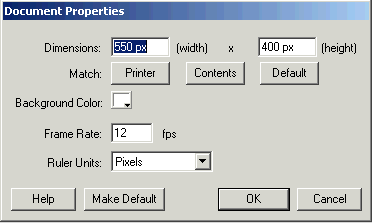 |
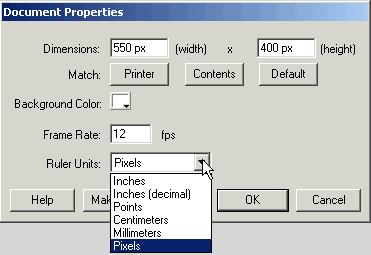
Step 5 - Click on Ruler units and you will get a drop down menu of the different units available in Flash. Step 6 - Save any changes you have made and continue to the next part of the tutorial - Keyframes. |
 |
Home
Page | Dreamweaver/Fireworks Introduction
| Flash Interface | Flash
Tools | Animation | Tweening
| Symbols/Instances | Buttons
| Sounds
Timeline | Properties
| Keyframes | Onion
Skinning | Frame Rate | Adding
and Deleting Frames | Copying Frames
| Testing