Grouping
This tutorial is to show you how to group and ungroup objects.
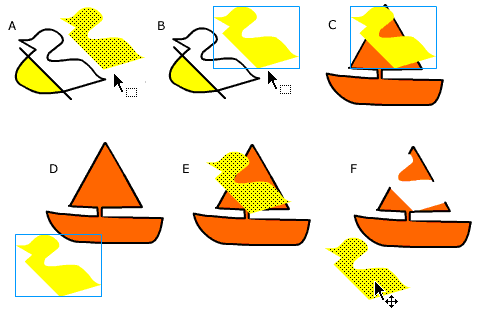
Step 1 - Pick up the Arrow tool and select the half of the object you separated in the previous tutorial (A). Step 2 - Choose Modify>Group (from modify on the menu bar) When you do this a blue rectangle appears around the object indicating that this is a grouped object (B). Step 3 - Drag the grouped object over another object (C). Step 4 - Deselect it by clicking on a blank section of the stage. Step 5 - Click and drag the first object off the second one (D). Step 6 - With the first object still selected choose Modify>Ungroup Now drag the first object back on top of the second one. Click to deselect (E). Step 7 - Select it again, and now drag it back off... notice how you're now missing part of the second object? (F). |
Grouping objects is an easy way of protecting them from unwanted editing. |