
Drawing with the Pencil
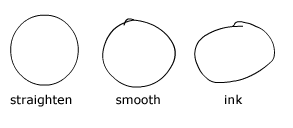
The Pencil tool is one you should be familiar with from other graphics programs. The Pencil Tool has three states: Straighten, Smooth, or Ink. By default it is in the Straighten
mode when selected |
 |
Pencil Exercise Step 2 - Draw a circle on the Stage. Step 3 - In the Toolbox click the Pencil mode and change it to Smooth. Step 4 - Draw another circle on the Stage next to the first one. Step 5 - In the Toolbox click the Pencil mode and change it to Ink. Step 6 - Draw a third circle on the Stage next to the first two. Did you notice the differences in the three different circles drawn with the pencil in three different modes? Step 7 - Try this same exercise with other shapes. |
Homepage
| Dreamweaver/Fireworks Intro | Flash
Interface | Flash Tools | Animation
| Tweening | Symbols/Instances
| Buttons | Sounds
Tools | Pencil
| Lines | Oval/Rectange
| Brush | Strokes/Fills
| Multiple Objects | Grouping
| Gradients | Pen |
Paths