
Ovals and Rectangles
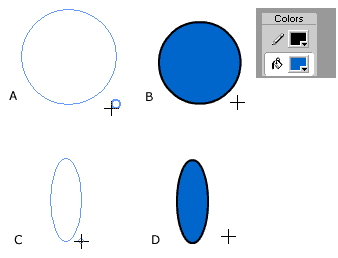
You can use the Pencil and Pen tools to create irregular shapes. But sometimes you will need to draw simple geometric shapes such as ovals, circles, squares, and rectanges. For these shapes you will use the Oval Tool or the Rectangle Tool. Notice that when you select the Oval Tool there are no options associated? In the Rectangle Tool there is one option. You will learn more about this later in this tutorial. Step 1 - Select the Oval Tool, hold down the shift key, and draw an object on the Stage. Notice that there is a large thick circle next to the crosshair cursor? This shows that you are drawing a perfect circle (A).
Step 2 - When you release the cursor notice how Flash uses the current Fill and Stroke colors to draw the circle (B). Step 3 - Repeat this exercise but this time do not
hold down the shift key. Notice the shape in the crosshair is smaller?
This shows that you are drawing an oval (C). Again, notice that
the current Fill and Stoke colors are being used (D). |

|
|

Step 5 - Making sure you have the rectangle tool selected, look at the tool Options in the Toolbox. Click the Round Rectange Radius button. This opens the Rectangle Settings box. Step 6 - Enter a number between 0 -999 in the corner radius setting. This will add rounded corners to the next rectangle you draw. |
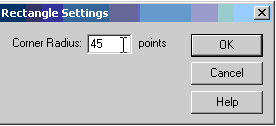 |
Step 7 - Draw a rectangle with the Corner Radius settings you selected. Notice that the one in this tutorial has settings of 45 points. |
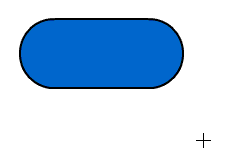 |
Homepage
| Dreamweaver/Fireworks Intro | Flash
Interface | Flash Tools | Animation
| Tweening | Symbols/Instances
| Buttons | Sounds
Tools | Pencil
| Lines | Oval/Rectange
| Brush | Strokes/Fills
| Multiple Objects | Grouping
| Gradients | Pen |
Paths